# Email API
With our simple, smart, and fully RESTful **Email APIs**, you can seamlessly integrate Email capabilities into your application and get started within seconds.
With Taqnyat, building powerful Email-enabled solutions has never been easier. Just a few lines of code are enough to activate messaging features and enhance your application to meet your business needs.
In the guide below, we’ll walk you through how the Taqnyat Email API works and how to start using it effectively.
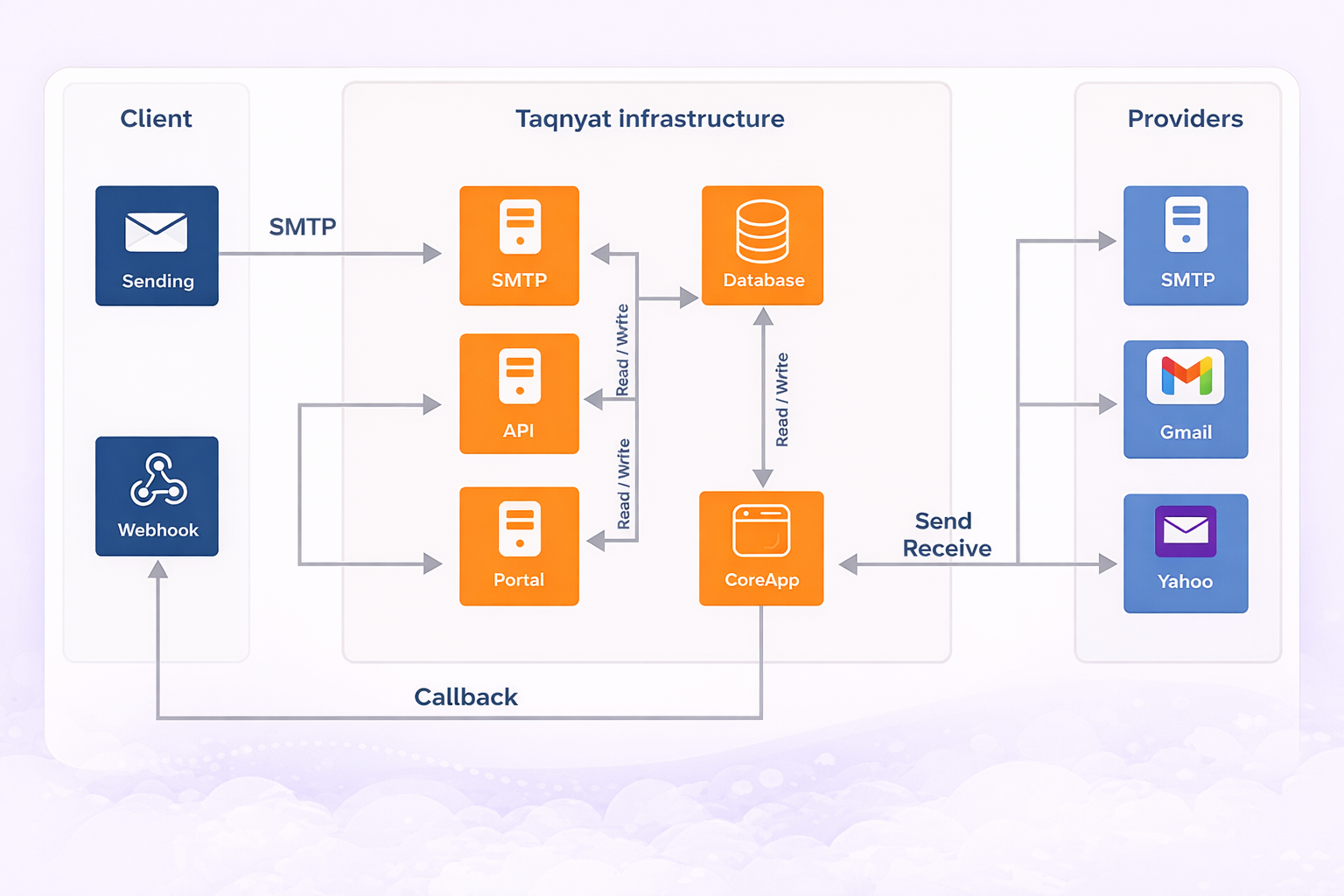
#### **Architecture Design**
#### **APIs Features:**
Connecting to the Taqnyat API is straightforward and flexible. You can integrate using standard HTML forms that submit data via **POST**, or by using the Email Builder available in the Taqnyat Portal.
We recommend using the **POST method**, as it provides greater flexibility and better integration with your existing systems. You may also submit requests in **JSON format** — a detailed explanation of the JSON structure is provided in this document.
All API responses are returned in **JSON**, ensuring compatibility with modern applications.
When connecting to the Taqnyat API over **HTTP or HTTPS**, email data must follow specific formatting requirements:
* **Sender Name** must be URL-encoded.
* **Message content** must be encoded in UTF-8.
#### **Before you go**
1. We recommended the one who is going to use this documentation or APIs to have programming skills.
2. The testing cost is nothing because we offer a free startup balance of 1 SAR for any trial account.
3. Cost calculation for messaging depends on how many emails you will send and how many destinations it will be receiving the emails.
4. You must have an active sender name before you go, you may contact or account manager to get more details about the requirements and how to activate your Sender Name.
####
#### Base URL
{% hint style="info" %}
All URLs resources in the Email documentation have the base URL `https://api.taqnyat.sa/`
{% endhint %}
#### Authentication
To use our API, you will need a unique Bearer token generated from your account at our platform by following the below steps [#setup-bearer](#setup-bearer "mention")
For REST API Bearer token must be submitted withen the header `Authorization`.
{% hint style="info" %}
If you failed to authenticate the request, response header with error 401 expected to return. You need to make sure passing the correct credential.
{% endhint %}
#### Setup Bearer token
With Taqnyat you can set up your bearer token in seconds using the below steps:
1. Login to your account at [Taqnyat](https://portal.taqnyat.sa/).
2. Select Application from Developer section.
3. Press the add button on the top right corner.
4. Choose a suitable name for your application.
5. Select the services you want this app to include , in our case Email.
6. Hit the confirm button to submit your application.
7. Copy the Bearer Tokens.
#### **Let us Get started**
To use taqnyat.sa API, you should have a taqnyat.sa account, here is an explanation of how you can register, checking your current balance, request a recharge for your balance through a “request recharge form” in taqnyat.sa website.
1. Registration process: You can register on taqnyat.sa website through the following link: [Contact](https://www.taqnyat.sa/en/contact/) and go to Sales tab ,fill the form and hit send.
2. Check your balance: You can check your current balance from the website after you logged at the dashboard.
3. Balance Topup: After your login to your [https://www.taqnyat.sa](https://www.taqnyat.sa/) account, you can request recharging your balance, through the request top-up form, you can access it through the balance top-up tab located in the left top corner. Fill all the required data in the form and we will top up your account within two hours at most after we validate the deposit.
4. Using bearer Tokens: bearer Tokens will have a unique value generated in the taqnyat.sa user account , because it provides a more secure connection with the API.
5. Setup API settings: taqnyat.sa provides security settings that allows you to control Emails sending through API. You can enable or disable sending Emails through API from your account, grant permission to specific IP’s to be allowed to send Emails message through API using your account, and grant permission to specific countries to be allowed to send Emails message through API using your account.
#### System
System resources are used to retrieve info about the system.
#### **System status**
This method used to retrieve status for one or multiple services in the system. [#authentication](#authentication "mention")is not required .
`GET` `/`system/status/
Here are some examples of HTTP API:
{% hint style="info" %}
{% endhint %}
if the request submitted **successfully header status of 200** will be return as follows:
**Response**
{% tabs %}
{% tab title="200" %}
```json
{
statusCode: 200,
status: {
service: "none",
description: "All Services are Operational"
}
}
```
{% endtab %}
{% tab title="405" %}
```json
{
"statusCode": 405,
"message": "Method Not Allowed"
}
```
{% endtab %}
{% endtabs %}
#### **Send a Mail**
Here are some examples of HTTP API:
{% hint style="info" %}
{% endhint %}
| Parameter | Description | Required |
| ------------ | ------------------------------------ | -------- |
| campaignName | The Name of Your Campain | Yes |
| subject | The Subject for your Email | Yes |
| from | The Sender Email | Yes |
| to | Array of Resivers Email | Yes |
| msg | The Message that you want to send it | Yes |
Here is some example of HTTP API to send text:
```shellscript
https://api.taqnyat.sa/mailSend.php?
bearerTokens=xxxxxxxxxxxxxxxxxxxxxxxxxx&
campaignName=your campain name&
subject= youe email subject&
from=mail@example.com&
to=mail1@example.com,mail2@example.com&
msg=your message text
```
Here is some example of HTTP API to send HTML code:
```shellscript
https://api.taqnyat.sa/mailSend.php?
bearerTokens=xxxxxxxxxxxxxxxxxxxxxxxxxx&
campaignName=your campain name&
subject= youe email subject&
from=mail@example.com&
to=mail1@example.com,mail2@example.com&
msg=test
```
{% tabs %}
{% tab title="201" %}
```json
{
"status": 1,
"ResponseStatus":"success",
"Data": {
"msgId":202,
"result":1,
"MessageAr":"تم الإرسال",
"MessageEn":"sent successfully",
"price":"0",
}
"Error":null,
}
```
{% endtab %}
{% endtabs %}
if the request return **ErrorCode 2**
```json
{
"status": 1,
"ResponseStatus":"fail",
"Data":null,
"Error": {
"ErrorCode":2,
"MessageAr":" الرصيد = 0",
"MessageEn":" Your balance is 0"",
}
}
```
if the request return **ErrorCode 3**
```json
{
"status": 1,
"ResponseStatus":"fail",
"Data":null,
"Error": {
"ErrorCode":2,
"MessageAr":" الرصيد غير كافي",
"MessageEn":" Your balance is not enough"",
}
}
```
if the request return **ErrorCode 14**
```json
{
"status": 1,
"ResponseStatus":"fail",
"Data":null,
"Error": {
"ErrorCode":14,
"MessageAr":" خطا في المرسل",
"MessageEn":" error From"",
}
}
```
if the request return **ErrorCode 15**
```json
{
"status": 1,
"ResponseStatus":"fail",
"Data":null,
"Error": {
"ErrorCode":15,
"MessageAr":" البريد الالكتروني المرسل لها غير صحيحه أو فارغه",
"MessageEn":" Email is not specified or incorrect"",
}
}
```
if the request return **ErrorCode 16**
```json
{
"status": 1,
"ResponseStatus":"fail",
"Data":null,
"Error": {
"ErrorCode":16,
"MessageAr":" يوجد خطا في عنوان الرساله",
"MessageEn":" error subject"",
}
}
```
if the request return **ErrorCode 17**
```json
{
"status": 1,
"ResponseStatus":"fail",
"Data":null,
"Error": {
"ErrorCode":17,
"MessageAr":" يوجد خطا في الرساله",
"MessageEn":" error msg"",
}
}
```
if the request return **ErrorCode 101**
```json
{
"status": 1,
"ResponseStatus":"fail",
"Data":null,
"Error": {
"ErrorCode":101,
"MessageAr":" الارسال باستخدام بوابات الارسال معطل",
"MessageEn":"Invalid Bearer Tokens",
}
}
```
\
if the request return **ErrorCode 102**
```json
{
"status": 1,
"ResponseStatus":"fail",
"Data":null,
"Error": {
"ErrorCode":102,
"MessageAr":" هذا الاي بي 10.0.0.1 غير مصرح له باستخدم بوابات الارسال",
"MessageEn":" this ip 10.0.0.1 Not authorized to using the API"",
}
}
```
\
if the request return **ErrorCode 104** , you are using wrong bearer Tokens make sure to follow the steps in above to setup your bearer Token [Setup Bearer token](https://dev.taqnyat.sa/ar/doc/mail/#setup-bearer)
```json
{
"status": 1,
"ResponseStatus":"fail",
"Data":null,
"Error": {
"ErrorCode":104,
"MessageAr":" مفتاح الارسال غير صحيح",
"MessageEn":"Invalid Bearer Tokens",
}
}
```
\
\
\
\
\
---
# Agent Instructions: Querying This Documentation
If you need additional information that is not directly available in this page, you can query the documentation dynamically by asking a question.
Perform an HTTP GET request on the current page URL with the `ask` query parameter:
```
GET https://docs.taqnyat.sa/email-api.md?ask=
```
The question should be specific, self-contained, and written in natural language.
The response will contain a direct answer to the question and relevant excerpts and sources from the documentation.
Use this mechanism when the answer is not explicitly present in the current page, you need clarification or additional context, or you want to retrieve related documentation sections.